 Dibyajyoti Kabi
Every few weeks you’ll see a headline like “Samsung has started testing One UI 9 on the Galaxy S26 FE”. It’s usually months before Samsung says a word about it. Here’s one from AndroidHeadlines from May 2026.
So where do these come from? Not from a secret source inside Samsung. Most of them come from a public file on Samsung’s own update server.
I will show you where that file lives, how it hides the build numbers, and how a short Python script can turn those hidden values back into real firmware versions. I ran it on the Galaxy S26 Ultra and the Galaxy S25 Ultra, and I’ll share what came out.
If you’re not sure how to read a Samsung build number yet, start with my post on Samsung firmware numbers explained. The rest of this post leans on it.
Two files for every phone
Samsung’s phones check for updates against a server called fota-cloud-dn.ospserver.net. For every model and country there’s a small XML file, and the URL follows a simple pattern.
https://fota-cloud-dn.ospserver.net/firmware/{CSC}/{MODEL}/version.xml
CSC is your country code, like INS for India, EUX for Europe or KOO for Korea. You can find yours in Settings > About phone > Software information > Service provider software version. MODEL is the full model number, like SM-S948N.
One thing before you try it. If you open that URL in a browser or hit it with a plain curl command, you’ll get an Access Denied page. The server only answers clients that look like a Samsung phone. Sending the user agent SAMSUNG-Android is enough.
version.xml is the file your phone actually reads. It lists the latest released build and every older build that can update from it. There’s nothing secret in it, and I covered it in the firmware numbers post.
Now change one word in the URL.
https://fota-cloud-dn.ospserver.net/firmware/{CSC}/{MODEL}/version.test.xml
This is the file that leaks.
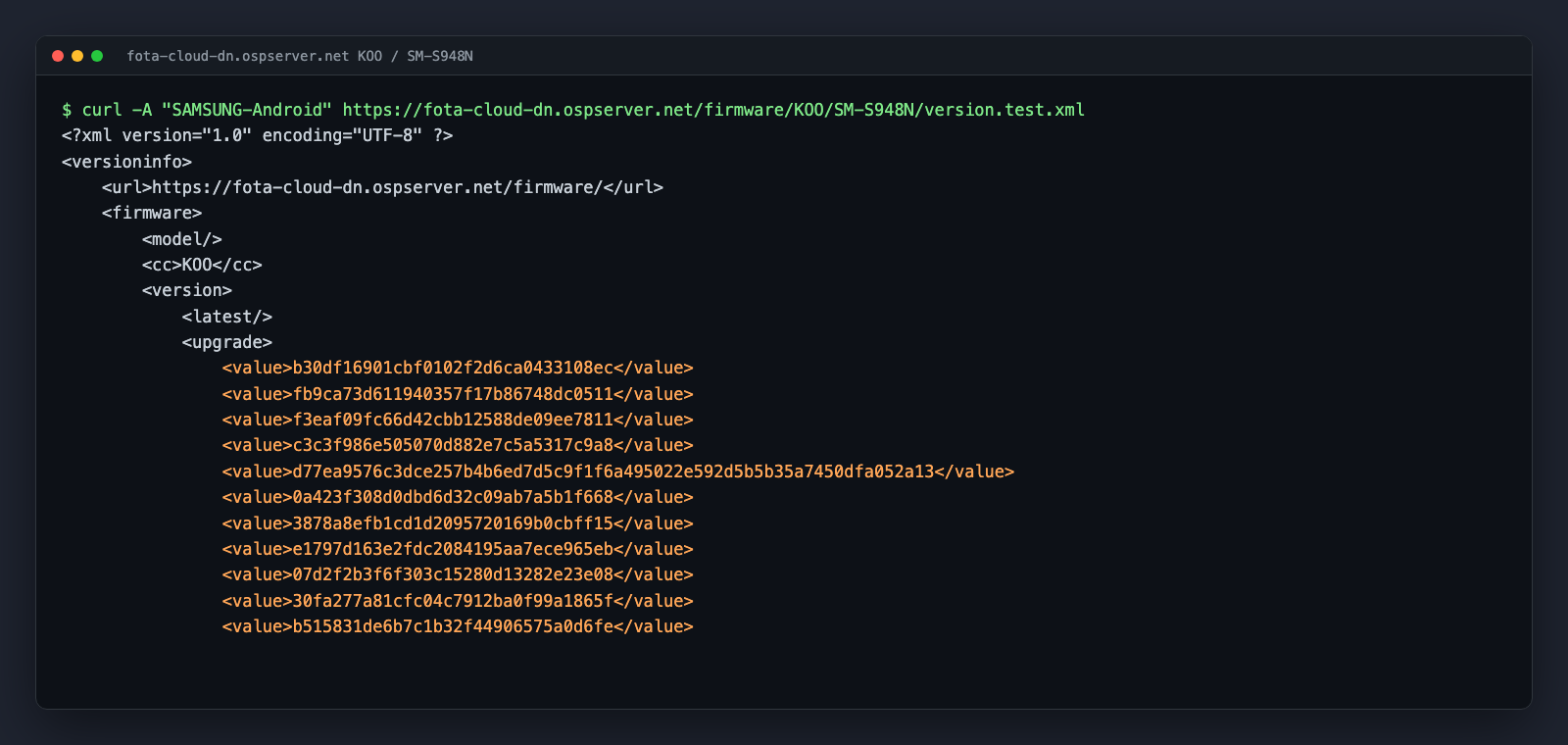
That’s the real test file for the Korean Galaxy S26 Ultra (SM-S948N), pulled on October 3, 2026. There’s no model name, no latest build, and no readable version numbers. Just a long list of hex strings.
The Korean S26 Ultra file has 99 of them.
What those strings really are
Each 32-character value is an MD5 hash of a full firmware string, in the same AP/CSC/CP format the public file uses.
You can check it yourself with one of the S26 Ultra’s public builds. Take the Korean launch-era build and hash it.
$ printf 'S948NKSU1AZAB/S948NOKR1AZAB/S948NKSU1AZAB' | md5
That’s the macOS command. On Linux, use md5sum instead of md5.
The result is one of the values sitting in the test file. I did this for every public build of the phones I checked, and almost all of them were there. On the S25 Ultra in India, 20 of the 21 released builds showed up in the test list.
So the test file is a list of every firmware Samsung has run through its test system for that model and region. That includes the ones that went public and the ones that haven’t.
Here’s the catch. MD5 can’t be reversed. You can’t take a hash and turn it back into text.
But you don’t need to. Samsung’s build numbers follow a strict pattern, so you can generate every build number that could exist, hash each one, and look for matches. That’s the whole trick.
How many guesses does it take?
Less than you’d think.
Take the Korean S26 Ultra. Every build starts with S948NKS and ends with five characters that follow known rules.
- The update type is U or S.
- The bootloader is 1 to 9 or A to F.
- The One UI generation is a letter from A upward.
- The year is Y (2025) or Z (2026) for a phone this new.
- The month is A to L.
- The build number is 1 to 9 or A to Z.
Multiply those out and you get around 126,000 possible build numbers. Your laptop can hash that many, plus the modem variations, in about a second.
The only real complication is the modem (CP) part. Most of the time it matches the main build exactly. Sometimes it’s the other update type, like an S build carrying a U modem. And sometimes Samsung reuses a modem from an older build. The script tries all three.
The script
Here’s the decoder I used. It needs nothing but Python 3.
import hashlib, itertools, re, sys, urllib.request

BASE = "https://fota-cloud-dn.ospserver.net/firmware"
CHARS = "123456789ABCDEFGHIJKLMNOPQRSTUVWXYZ"

def fetch(cc, model, name):
    req = urllib.request.Request(f"{BASE}/{cc}/{model}/{name}",
                                 headers={"User-Agent": "SAMSUNG-Android"})
    return urllib.request.urlopen(req, timeout=20).read().decode()

def md5(text):
    return hashlib.md5(text.encode()).hexdigest()

cc, model, pda, csc = sys.argv[1:5]  # e.g. KOO SM-S948N S948NKS S948NOKR
public = re.findall(r">(\w+/\w+/\w*)<", fetch(cc, model, "version.xml"))
hashes = set(re.findall(r"<value>([0-9a-f]{32})<", fetch(cc, model, "version.test.xml")))
hashes -= {md5(b) for b in public}

# Every tail: bootloader, One UI generation, year, month, build
tails = ["".join(t) for t in itertools.product(
    "123456789ABCDEF", "ABCDE", "YZ", "ABCDEFGHIJKL", CHARS)]
modems = {b.split("/")[2] for b in public}
found = {}
for kind, tail in itertools.product("US", tails):
    prefix = f"{pda}{kind}{tail}/{csc}{tail}/"
    for modem in [pda + kind + tail, pda + "US"[kind == "U"] + tail, *modems]:
        if md5(prefix + modem) in hashes:
            found[prefix + modem] = True

print(f"{len(found)} of {len(hashes)} test builds decoded")
for build in sorted(found, key=lambda b: b.split("/")[0][-3:]):
    print(build)
Save it as decode.py and run it with four values: the CSC code, the model, the start of the AP version and the start of the CSC version.
python3 decode.py KOO SM-S948N S948NKS S948NOKR
For the global S25 Ultra in India, it would be this.
python3 decode.py INS SM-S938B S938BXX S938BOXM
If you don’t know the prefixes for your phone, look at your current build number and CSC version. The first prefix is the model plus the two region letters (S948NKS). The second is the model plus the three-letter CSC code (S948NOKR).
What came out for the Galaxy S26 Ultra
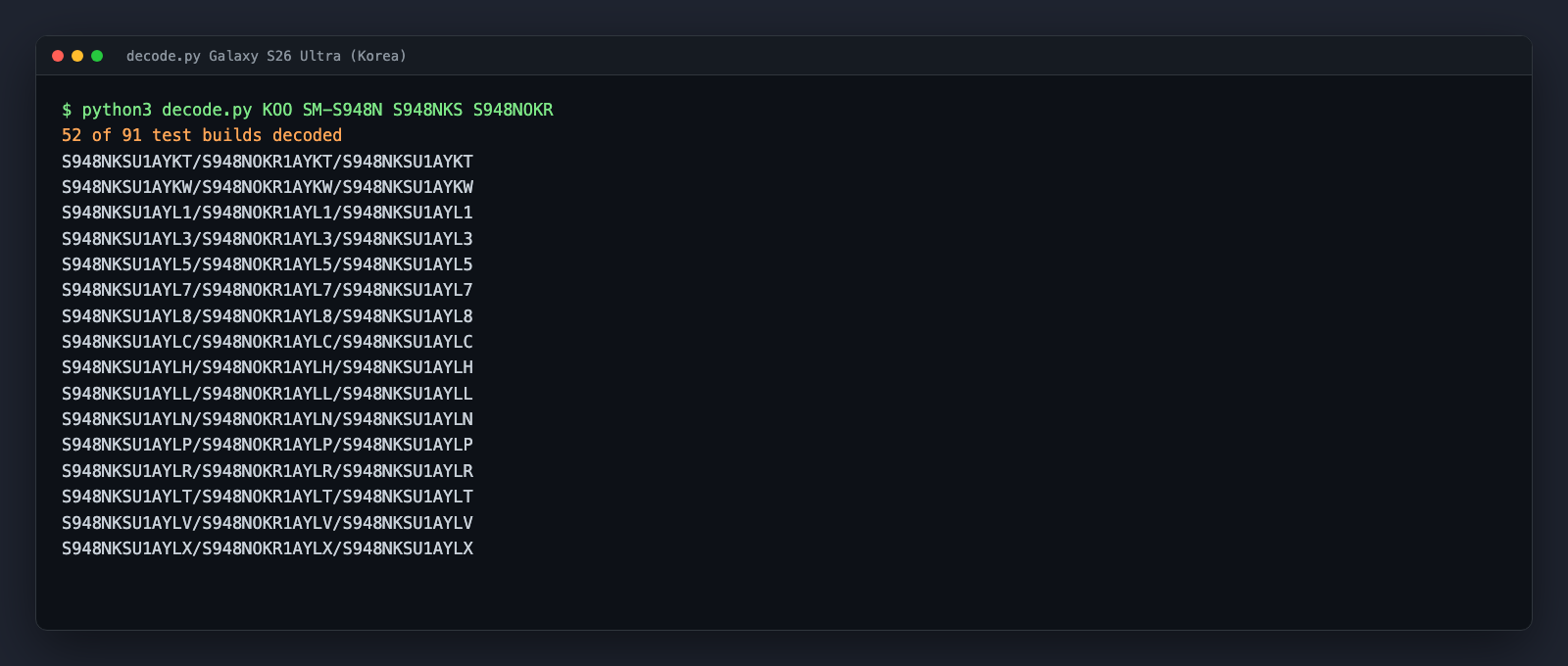
Out of the 91 hashes that didn’t match a public build, the script decoded 52. That’s a list of real S26 Ultra firmware builds that Samsung tested and never released in Korea.
Look at the first one. S948NKSU1AYKT. Y is 2025 and K is November.
That’s a build of the S26 Ultra’s software from November 2025. Samsung didn’t announce the phone until Galaxy Unpacked on February 25, 2026. The model number alone, SM-S948N, was sitting on a public server with a stack of test builds behind it, three months early.
There’s more. The decoded list runs month by month all the way to August 2026, with builds like S948NKSU4AZHL. You can see Samsung bump the bootloader from 1 to 4 over that time, and you can see where the security-only builds slot in.
The S25 Ultra and One UI 8.5
The S25 Ultra tells an even better story.
I ran the same script on the Indian S25 Ultra (SM-S938B). One of the decoded builds was S938BXXU5CYIA.
Read it the usual way. C is the third One UI generation, Y is 2025 and I is September. A third-generation build for the S25 Ultra means One UI 8.5, and this one was built in September 2025.
The stable One UI 8.5 rollout started on May 6, 2026. So Samsung’s test file held One UI 8.5 builds for this phone that were dated roughly eight months before anyone got the update.
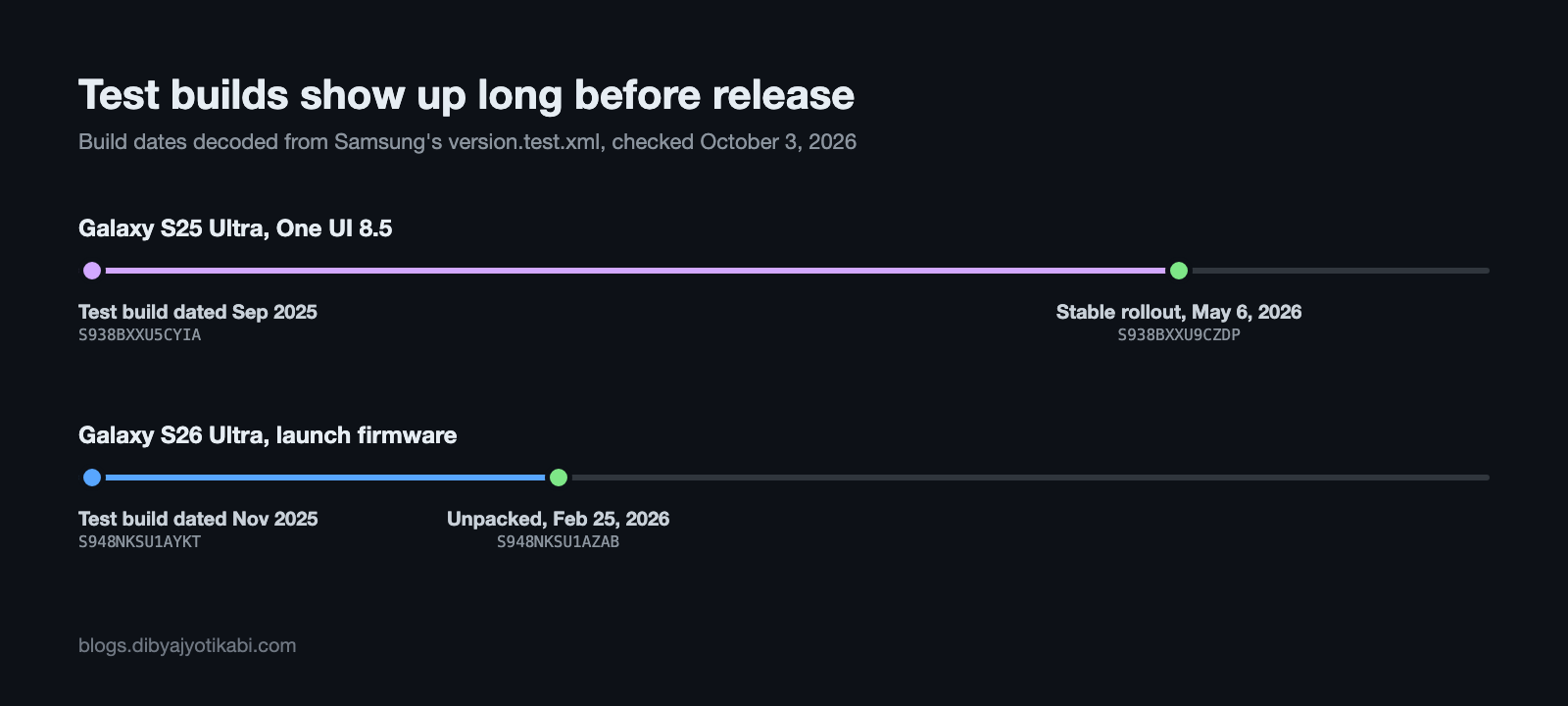
One honest note here. The build letters tell you when Samsung built the firmware, not the day it appeared in the test file. Samsung doesn’t publish that. But a build can’t be in the list before it exists, so the build date is the earliest it could have shown up.
This is exactly how those leak headlines work. Someone checks the test file for a phone, decodes a build with a new generation letter, and that’s the first public sign that a big update is in testing.
What the script can’t tell you
I don’t want to oversell this, so here’s what you don’t get.
- You only get build numbers. Nothing in the test file tells you what’s inside a build, so there are no features, no changelogs and no screenshots.
- You can’t download anything. The test file is just a list of hashes. The firmware itself isn’t there.
- Not everything decodes. On the S26 Ultra, 39 hashes are still unknown to me. Some probably pair the main build with a modem or CSC from a different month, and my script doesn’t guess those yet.
- Some lists look incomplete. The S26 Ultra’s current One UI 9 build (S948NKSS4BZIG) is public, but its hash isn’t in the Korean test list at all, and I didn’t find any One UI 9 test builds there. All three S26 Ultra lists I checked (India, Europe and Korea) had exactly 100 entries, while the S25 Ultra’s list in India had 207. I don’t know yet if that’s a limit, a cleanup or something else.
- There are a few 64-character values in the lists. One of them, starting with d77ea957, shows up in five of the six lists I checked, across different phones and countries, so it isn’t a build number. I haven’t worked out what these are.
Use it politely
Everything here is public. There’s no login, no bypass and nothing hidden. The files are served to every Galaxy phone that checks for an update.
Still, be decent about it. Fetch each file once and do the hashing on your own machine, which is what the script already does. Don’t loop it every few seconds across hundreds of models. And remember Samsung can change or remove this file whenever it likes.
Where this idea came from
I didn’t come up with this. The hashing trick has been discussed for years in an XDA thread on Samsung test firmware, and the SamFetch project documents the server in its resources notes. What I’ve added is a working script for current phones and real numbers from October 2026.
I also use the same server for SamUpdater, which tracks the released builds for each model and region.
Wrapping up
That’s it. One public XML file, one hash function and about 126,000 guesses are all it takes to see what Samsung is testing months before it ships.
I’m going to keep watching these files, especially for the first builds dated 2027. As I explained in the firmware numbers post, the year letter has already reached Z, and the test file is where the new format will show up first.
If you run the script on your own phone and find something interesting, or it doesn’t work for your model, send me your model number and CSC code and I’ll take a look.