 Dibyajyoti Kabi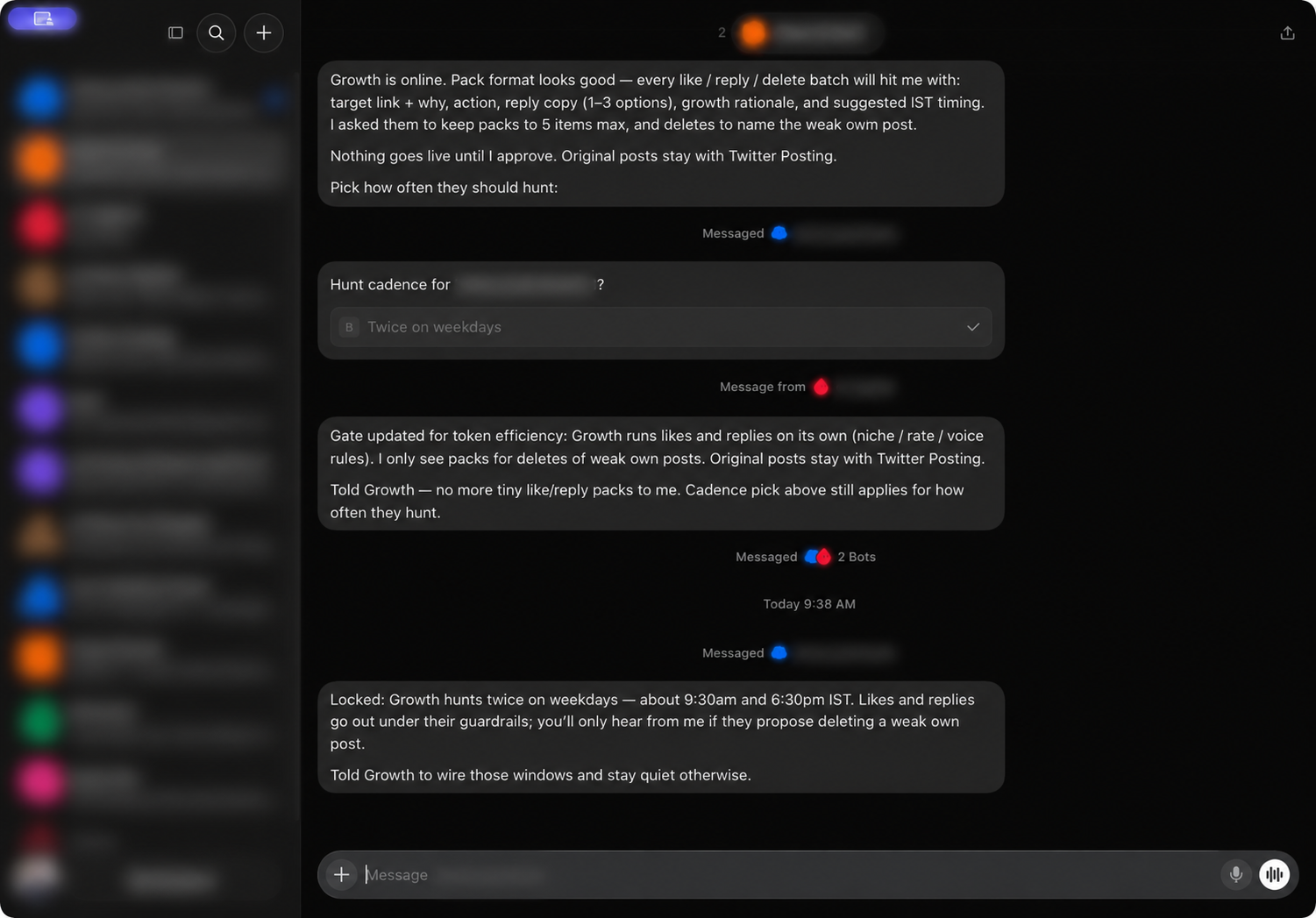
The useful part of an AI assistant setup is not the number of bots. It is the boundaries between them.
I use Grok Bot as a small operations room: each assistant has a narrow job, and a coordinating assistant keeps the overall workflow legible. News filtering, audience engagement, and original publishing have separate owners. That separation makes it easier to see what a bot may do, what it must skip, and where I still want a person in the loop.
Start with clear ownership
The workspace contains several specialist assistants. The setup is easier to manage when each one owns a distinct action rather than receiving a broad instruction such as “handle social.”
- Coordination: One assistant keeps track of which specialist owns each task, records the current rules, and reports meaningful changes.
- News filtering and replies: A reply-focused assistant receives a bounded batch of candidate posts, evaluates every item, and replies only when it passes the relevance bar.
- Growth routines: A separate assistant runs a scheduled audience-engagement routine under niche, rate, and voice rules.
- Original publishing: A dedicated assistant owns original posts. Reply workflows are told not to create original posts or quote posts.
- Research and support: Other specialists handle bounded research, inbox, and platform-specific tasks.
This split is simple, but it prevents a common failure mode: a bot that was asked to react to a post quietly becoming a bot that publishes anything it can think of.
Make the input small and explicit
The news-reply workflow is given a defined batch of candidate posts. It is told to judge each item on its own, rather than picking one item from the whole batch and ignoring the rest. It does not search for more posts or open extra tabs during that run.
The rule is to reply only to a major product announcement, launch, or outage in scope. Low-signal mentions and unrelated stories are skipped. If a batch contains several qualifying items, the assistant can prioritize the most important one and stagger the rest; one reply in the current hour is not a reason to discard another distinct, important update.
That last detail matters. A crude rate limit can prevent bursts, but it should not erase useful coverage. The workflow considers the items individually, then applies timing to the actions that qualify.
Keep original posts separate from replies
The reply assistant is explicitly limited to replies. It does not create original posts, quote posts, or hand off its work to a separate scheduling service. Original publishing stays with its own specialist.
This gives the system a clear boundary: a reply is a response to a specific source item, while an original post represents a separate editorial decision. Keeping those paths separate makes it easier to review the source, the wording, and the destination before anything new is published.
Schedule routines, then tune the approval gate
The growth routine is configured for two weekday runs in morning and evening windows (India Standard Time). I check the assistant’s next-run status after changes so the displayed schedule stays aligned with the intended cadence. Likes and replies run within the routine’s configured topic, rate, and voice rules. The coordinator stays quiet unless there is a meaningful exception, such as a proposed deletion of a weak existing post.
The approval gate changed as the workflow matured. Initially, every small engagement action was being packaged for review. That created noise without adding much oversight. The current arrangement lets routine likes and replies run within guardrails while sending deletion proposals to the coordinator for review. Original posts remain separate.
The lesson is to place human review where it changes the outcome. A gate that interrupts every low-risk action becomes easy to ignore. A focused gate for deleting existing content or approving a new editorial action is more useful.
Keep the coordinator quiet by default
The coordinating assistant is useful as a control point, not as a second copy of every bot conversation. It keeps routing and approval rules up to date, and it surfaces exceptions instead of forwarding tiny status messages all day.
A quiet-by-default policy has two benefits: fewer notifications and a clearer signal when something does need attention. For example, a deletion proposal should include the target, the reason it is weak, and the suggested action. A routine run with no exception does not need a report.
Treat secrets as configuration, not content
MCP endpoints, webhook URLs, sender keys, and tokens do not belong in a public post, a screenshot, or a conversation transcript. Keep connection details in private configuration or a secret store, and share only redacted screenshots. This article deliberately omits account names, account handles, and connection URLs.
The redacted screenshot above keeps the workflow visible while hiding the account list and identifying labels. It is a useful reminder that a setup can be documented without publishing the credentials or identities behind it.
A checklist for a new assistant
Before adding another specialist, I write down:
- The input it may use. Is it given a bounded queue, or may it search more widely?
- The exact action it owns. Does it reply, publish, summarize, or only prepare a proposal?
- The actions it must never take. Examples include creating original posts from a reply-only routine or widening the task scope.
- The rate and schedule. When should it run, and what should it do when nothing qualifies?
- The review point. Which actions can run within guardrails, and which need approval?
- The reporting rule. Should it stay quiet when nothing needs attention?
- The secret boundary. Which values belong in private configuration instead of prompts, screenshots, or published content?
A narrow assistant with clear limits is easier to trust than a general-purpose one with a long list of exceptions. The goal is not maximum autonomy. It is predictable automation that saves attention while leaving the important decisions visible.