 Dibyajyoti Kabi
If you have ever opened Settings > About phone > Software information on a Galaxy phone, you’ve seen a string like S938BXXSCCZH1 under Build number. Most people scroll right past it.
I don’t. I’ve been reading these strings for years, first while writing firmware guides and now while running SamUpdater, which watches Samsung’s update servers all day.
That string tells you which model you have, where it was meant to be sold, what kind of update you’re on, how many major One UI upgrades the phone has had, and the month the build was made. Once you can read it, you can tell if your phone is behind before Samsung’s own update screen does.
There’s also a small problem coming. The letter that stores the year has reached Z. I will get to that at the end.
Every example in this post is a real build that I pulled from Samsung’s update server on October 3, 2026.
Where to find your firmware number
You can see it in two places on any Galaxy phone.
- Open Settings > About phone > Software information.
- Look at Build number. That’s the main firmware (AP) version.
- For the full picture, open the Phone app and dial *#1234#. You’ll see three lines: AP, CP and CSC.
AP is the actual Android and One UI software. CP is the modem firmware that talks to the cellular network. CSC holds the country and carrier settings.
Samsung’s own servers list every build as those three joined together, in the order AP/CSC/CP. Here’s what the server returns for the Galaxy S25 Ultra (SM-S938B) in India right now.
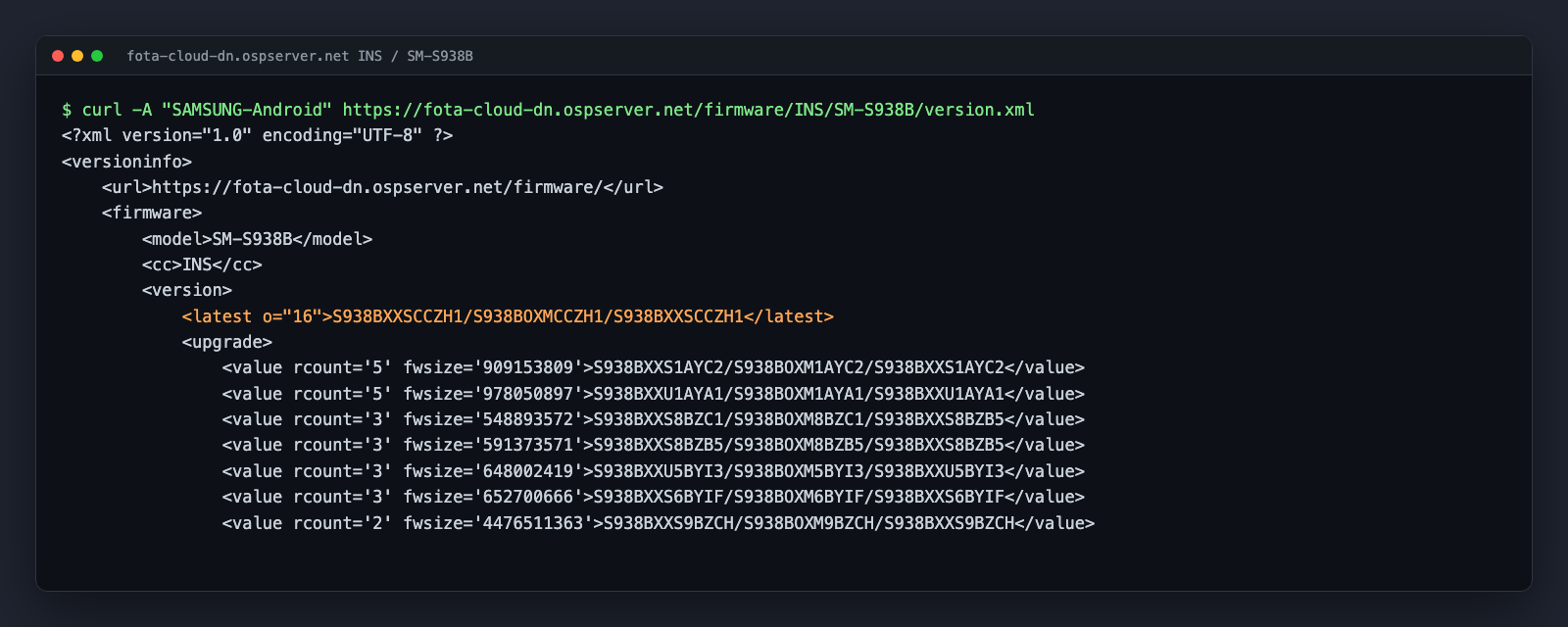
The line that starts with <latest is the build every S25 Ultra in India should be on today: S938BXXSCCZH1/S938BOXMCCZH1/S938BXXSCCZH1. The o="16" part is the Android version, so this build is Android 16.
Everything under <upgrade> is an older build that phones can update from.
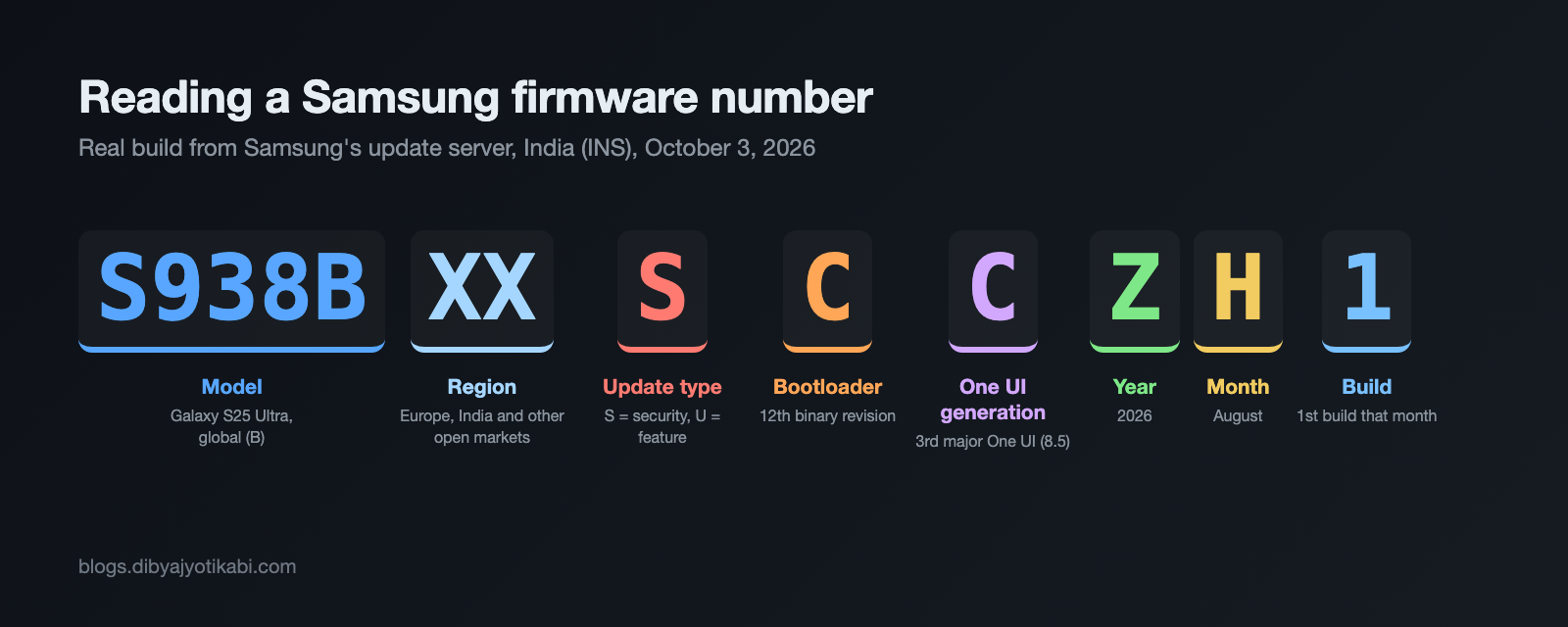
Breaking down S938BXXSCCZH1
Let’s take that S25 Ultra build apart one piece at a time. I’ll use other live builds along the way so you can see how each part changes.
S938B: the model
The first part is just the model number without the “SM-” in front.
S means Galaxy S series. A means Galaxy A, F means foldables (Z Fold and Z Flip), and so on. In S938B, the “93” points to the Galaxy S25 family and the “8” is the Ultra. The S26 Ultra is S948B.
The last letter is the variant. B is the global model sold in Europe, India and most open markets. N is the Korean model, U is the US carrier model and U1 is the US model sold without a carrier. A-series phones often use E for their global variant, like the Galaxy A56 (SM-A566E).
XX: the region
The next two letters tell you which group of markets the firmware was built for.
- XX is the big open-market group, which covers Europe, India and many other regions.
- KS is Korea. The S26 Ultra build in Korea right now is S948NKSS4BZIG.
- UE is the US U1 model. The S25 Ultra U1 build is S938U1UESCCZF9.
- SQ is used on US carrier models.
If you buy a phone that was imported from another country, this is the quickest way to spot it.
S: the update type
This single letter tells you what kind of update the build is.
- U means a feature update. It can bring new features, bug fixes and security patches.
- S means a security update. It’s mostly the monthly patch with small fixes.
You will sometimes see a mix. The current S26 Ultra build in India is S948BXXS4BZIG, but its modem part is S948BXXU4BZI9. The main software was a security build while the modem came from an earlier feature build.
C: the bootloader version
This one matters more than people think. It’s the bootloader (or binary) revision, and it counts up as 1 to 9, then A, B, C, D, E and F.
The S25 Ultra launched in early 2025 on S938BXXU1AYA1, so bootloader 1. It’s now on C, which is the 12th revision.
Here’s why you need to know this. You can’t flash firmware with a lower bootloader number than the one on your phone. Samsung blocks it to stop old security holes from being reopened. If you try it in Odin, it fails with an SW REV CHECK FAIL error.
So if your phone is on bootloader C, any firmware with B or lower is off the table for good. Before you download a firmware file to flash, check this letter first.
C: the One UI generation
The second letter after the update type tells you how many major One UI versions the phone has received. A is the software it launched with. B is the first big upgrade, C is the second, and so on.
Look at the S25 Ultra in India and you can watch this happen in the server’s build list.
- S938BXXU1AYA1 is the launch firmware with One UI 7. Generation A.
- S938BXXU5BYI3 is the first One UI 8 build from September 2025. Generation B. Samsung announced the official One UI 8 rollout that same month.
- S938BXXU9CZDP is the first One UI 8.5 build from April 2026. Generation C. The stable One UI 8.5 rollout started on May 6, 2026.
There’s one thing I want you to notice here. One UI 8 and One UI 8.5 are both Android 16, yet each one got a new letter. So this letter tracks major One UI releases, not Android versions. For the Android version, the o= value on the server is the better clue.
The S26 Ultra shows the same thing. It launched with One UI 8.5 (generation A), and its current build S948BXXS4BZIG is generation B with o="17". That’s One UI 9 on Android 17, which started rolling out to the S26 series in late September 2026.
Z: the year
The year letter started at A for 2001 and moves up one letter every year.
- X is 2024
- Y is 2025
- Z is 2026
So S938BXXU1AYA1 was built in 2025, and S938BXXSCCZH1 was built in 2026.
H: the month
The month runs from A for January to L for December. H is August.
That means S938BXXSCCZH1 was built in August 2026. The S26 Ultra build ending in ZIG was built in September (I).
Keep in mind this is when Samsung built the firmware, not when it reached your phone. Rollouts often land a few weeks after the build date.
1: the build number
The last character is the build count for that month. It goes 1 to 9, then A to Z.
So ZH1 is the first build of August 2026, while a build like S938BXXS7BYLR is the 27th build of December 2025. A high letter here usually means Samsung had to rebuild the firmware several times before it was ready.
The CSC part works the same way
The middle part of the full firmware string is the CSC version, like S938BOXMCCZH1.
It starts with the same model number, then a three-letter CSC code, then the same tail as the main firmware.
- OXM is the multi-CSC package used across Europe, India and many other markets. Your actual country code (INS for India, EUX for Europe) sits inside it.
- OKR is Korea, as in S948NOKR4BZIG.
- OYM is the US U1 model, as in S938U1OYMCCZF9.
- ODM shows up on A-series phones in India and other Asian markets, as in A566EODMECZI3.
Real builds you can compare against
Here’s what Samsung’s server listed as the latest build for a few popular models on October 3, 2026. If your phone shows an older build, an update is waiting for you or still on its way.
| Device | Region | Latest build (AP) | Android |
|---|---|---|---|
| Galaxy S26 Ultra (SM-S948B) | India and Europe | S948BXXS4BZIG | 17 |
| Galaxy S26 Ultra (SM-S948N) | Korea | S948NKSS4BZIG | 17 |
| Galaxy S25 Ultra (SM-S938B) | India | S938BXXSCCZH1 | 16 |
| Galaxy S25 Ultra (SM-S938U1) | US | S938U1UESCCZF9 | 16 |
| Galaxy A56 (SM-A566E) | India | A566EXXSECZI3 | 16 |
Builds change often, so treat this as a snapshot. You can always check the live version for your model and region on SamUpdater.
What happens after Z?
Now for the fun part.
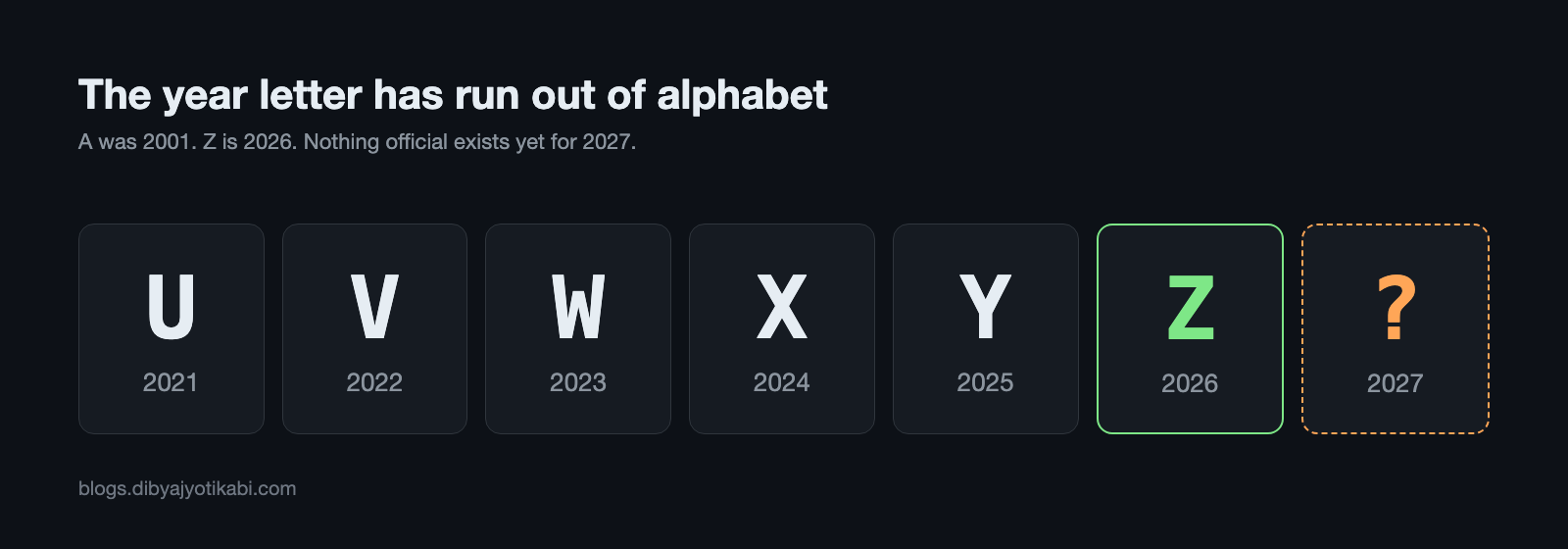
Samsung’s year letter has used one letter per year since 2001. Z is 2026. There is no letter after Z, so every build Samsung makes from January 2027 needs a new scheme.
Samsung hasn’t said anything about this publicly, and as far as I can tell, nobody else has written about it either. So I can’t give you an answer yet. What I can give you is the options.
- Wrap back to A. A build from January 2027 would end in something like AA1. It looks odd, but it doesn’t break much. Samsung’s downgrade protection uses the bootloader number, not the date, so an “older looking” letter wouldn’t let anyone roll back.
- Add a character. The tail could grow by one letter or digit for the decade. Every tool, website and script that reads these numbers by position would need to be updated, including mine.
- Change the format completely. Samsung could use this moment to move to a different system, maybe with numbers for the year.
My guess is option 1, because it changes the least. But that’s only a guess.
The good news is we won’t have to wait for a release to find out. Samsung puts test builds on its servers months before they reach anyone’s phone. The S26 Ultra had test builds dated November 2025, three months before it was even announced. So the first 2027 builds should start showing up there very soon, and I’m going to keep checking. I’ll update this post the moment one appears.
I will cover how those test builds can be read in a separate post.
Wrapping up
That’s it. A string that looks like random noise is really a short report on your phone. The model and region tell you what you have, the update type and generation tell you what you’re running, and the last three characters tell you when it was built.
The one I’d pay most attention to is the bootloader number. It decides what you can and can’t flash.
If you have a firmware number you can’t make sense of, send it to me along with your phone’s model number and region, and I’ll help you decode it.