 Dibyajyoti Kabi
Samsung started pushing the stable One UI 9 update on September 16, and it’s now landing on a lot more phones. If you own a Galaxy from the last three years, there’s a good chance it’s either waiting for you or on its way.
In this post, I will show you which devices get it, how big the download is, and how to check for it. I’ll also show you how to tell from the build number alone whether you’re already on One UI 9. That last part is handy when a friend asks “Did I get it?” and you don’t want to dig through menus.
What Samsung announced
One UI 9 is based on Android 17. Samsung’s official rollout announcement says the stable build started with the Galaxy S26, S26+ and S26 Ultra.
The foldables were ahead of everyone. The Galaxy Z Fold8 Ultra, Z Fold8 and Z Flip8 shipped with One UI 9 back in July, so owners of those phones already have it.
After the S26, the list in Samsung’s footnotes includes these devices:
- Galaxy S25, S25 FE
- Galaxy S24, S24 FE
- Galaxy S23, S23 FE
- Galaxy Z Fold7, Z Flip7
- Galaxy Z Fold6, Z Flip6
- Galaxy Z Fold5, Z Flip5
- Galaxy Tab S11, Tab S10 and Tab S9 series
The A series is coming too. The update has already been spotted on the Galaxy A57 in Europe. Samsung doesn’t publish exact dates for every model and region, so expect it to arrive in waves.
Where it has reached so far
Here’s what has been reported over the last few weeks.
- Korea got it first on the Galaxy S24, Z Fold6 and Z Flip6. The download is about 3.8GB if you were not in the beta, and about 500MB if you were (9to5Google).
- In India, the Galaxy S24 build ends in EZIF and comes with the September 2026 security patch.
- In the US, the S24, Fold6 and Flip6 started getting it in late September. It’s about 4GB (Android Authority).
- US Galaxy S26 owners who were in the beta got a smaller update of about 650MB.
If your phone is on the list and you still haven’t got it, don’t worry. Carrier models in the US usually lag behind unlocked ones by a few days to a couple of weeks.
How to check for the update
You can trigger the check manually. Make sure you’re on Wi-Fi and the battery is above 50%, because this is a big download.
- Open the Settings app on your Galaxy phone.
- Scroll down and tap Software update.
- Tap Download and install.
- If One UI 9 is available, you’ll see the changelog and the download size. Tap Download.
- Once it finishes, tap Install now or schedule it for the night.
The install takes around 15 to 25 minutes on a full update. Your phone will restart a couple of times. That’s normal.
If it says your software is up to date, check again in a day or two. Samsung rolls it out in batches, so two people with the same phone in the same city can get it on different days.
How to tell from the build number
This is my favorite part. You don’t need to open the About screen to know which One UI version a phone is on. The build number tells you.
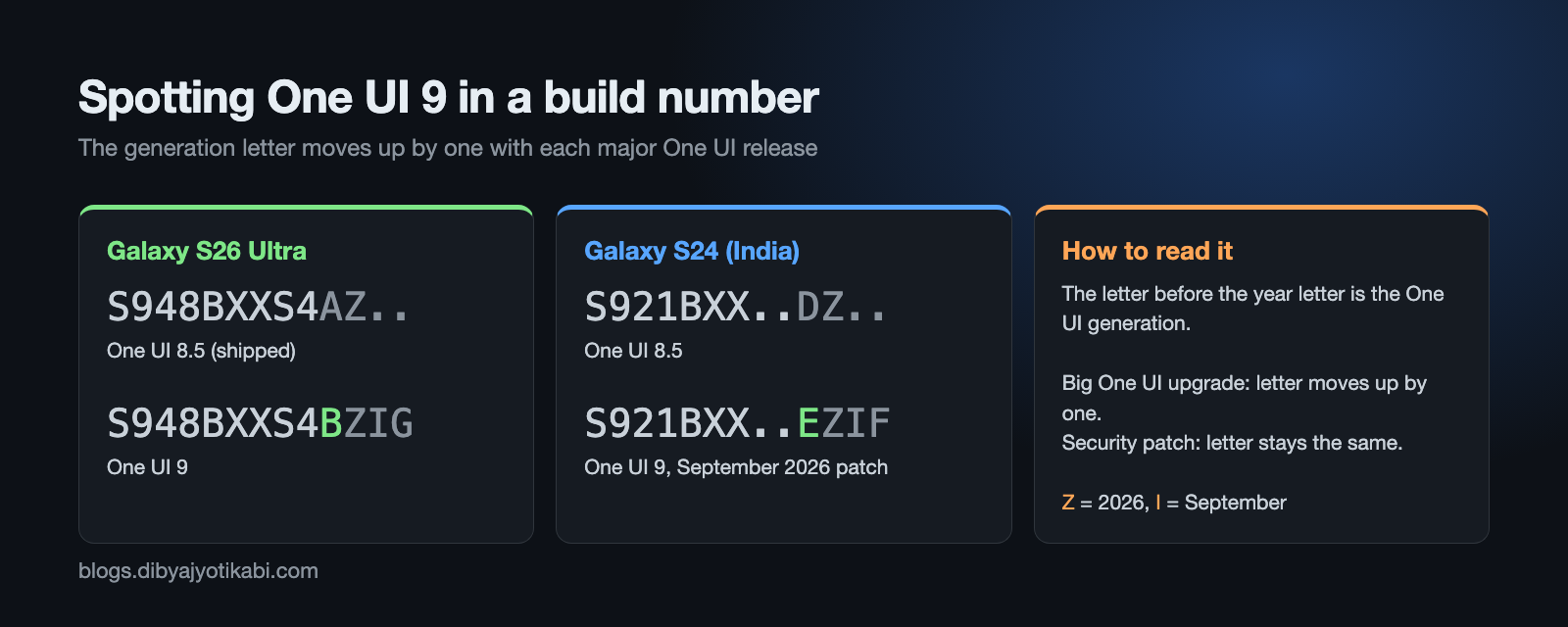
Go to Settings > About phone > Software information and look at Build number. On an S26 Ultra with One UI 9, it looks something like S948BXXS4BZIG.
The letter right before the year letter is the One UI generation. I covered this in detail in my post on how Samsung firmware numbers work, so here’s the short version:
- Every phone starts at A with the One UI version it shipped with.
- Each big One UI upgrade moves that letter forward by one.
- Security patches and small updates keep the same letter.
So on the S26 Ultra, A was One UI 8.5 (what it shipped with) and B is One UI 9. On the Galaxy S24, which shipped with One UI 6.1, the letter has moved all the way to E by now. That’s why the Indian S24 build ends in EZIF.
Here’s why this matters. The letter tracks One UI releases, not Android versions. Samsung’s half-step releases like One UI 8.5 also bump it. So don’t try to map the letter straight to an Android number. Compare it with an older build from the same phone instead.
The last three characters are year, month and build count. In EZIF, Z means 2026, I means September and F is the build counter.
What’s new in One UI 9
I won’t go through every change, but these are the ones I think most people will notice.
- My FanCam, a new camera mode that keeps one person in focus and in frame during a group video.
- Now Brief gets generative cards that you can edit, plus a Security Brief that sums up your phone’s security status.
- Now Nudge, which suggests actions based on what’s on your screen.
- Warranty and Care, a new section in Settings where you can check your warranty, run self-diagnostics, see repair estimates, check Samsung Care+ and book a service appointment.
- Interpreter gets a Thread View, so a translated conversation reads like a chat.
- Document Scan can flatten curved pages from a book, and Finger Eraser removes your fingers from the scan.
- Voice Recorder summaries now come with headings and tables.
- Privacy Alerts use on-device AI to warn you when an app does something suspicious.
- Scam Detection for calls is expanding to Japan, Canada and India.
The Warranty and Care section is the one I’d check first. Being able to see a repair estimate before walking into a service center is genuinely useful, especially for older phones.
Should you install it right away?
For most people, yes. The update also carries the latest security patch, and you can’t skip a One UI version forever anyway.
If your phone is your only work device, though, waiting a week is not a bad idea. Early builds sometimes ship with small bugs that get fixed in the first follow-up patch. You’ll know a fix has landed when the build number keeps the same generation letter but the last character changes.
Ever wondered how sites report new One UI builds months before Samsung says a word? Most of it comes from one public file on Samsung’s server. I showed how to read it in my post on how One UI leaks happen.
If you want to see new builds the moment Samsung puts them on the server, I built SamUpdater for exactly this. You can look up the latest firmware for your model and region there, and the free Sam Updater Android app sends you an alert when a new build shows up.
Wrapping up
That’s it. Check Settings > Software update, and if nothing shows up yet, give it a few days.
Did your phone get One UI 9 already? Send me your model number, region (like SM-S921B, India) and build number, and I’ll help you read it.